
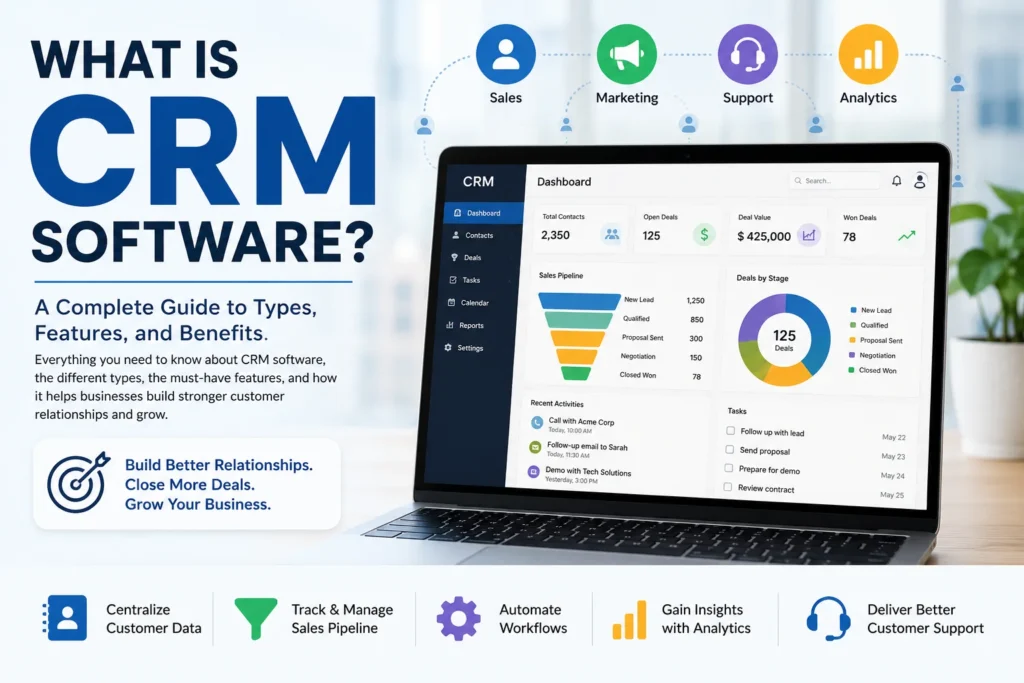
Every business, no matter how small, is really in the business of managing relationships: with leads, customers, and everyone in between. As those relationships scale past a handful of contacts, spreadsheets and sticky notes stop working. That’s the exact problem CRM software was built to solve, and it’s become one of the most widely adopted categories of business software in the world.
This guide explains what CRM software actually is, the different types available, the core features that matter most, and where the category is headed as AI reshapes how businesses manage customer relationships.
What Is CRM Software?
CRM stands for customer relationship management. CRM software is a platform that helps businesses centralize customer information, track every interaction across sales, marketing, and support, and automate the workflows that keep those relationships organized.
Salesforce, one of the most widely used CRM providers, describes CRM as technology for managing a company’s relationships and interactions with customers and potential customers, with the core goal being simple: improve business relationships. A CRM system helps companies stay connected to customers, streamline processes, and improve profitability.
Put simply: a CRM replaces scattered spreadsheets, sticky notes, and inbox threads with a single, shared source of truth that sales, marketing, and support teams can all work from.
What Does CRM Software Actually Do?
At its core, CRM software performs a consistent set of functions regardless of the specific platform:
- Stores contacts and companies — names, emails, phone numbers, job titles, and custom fields like industry or deal size.
- Tracks deals through a sales pipeline — typically visualized as stages such as New Lead, Qualified, Proposal Sent, and Closed Won.
- Logs every interaction — calls, emails, meetings, notes, and attachments, all tied to the correct contact record.
- Automates repetitive work — task reminders, follow-up emails, lead routing, and lifecycle stage updates.
- Generates reports and analytics — tracking pipeline value, conversion rates, team performance, and revenue trends.
- Coordinates marketing campaigns — segmenting customers and measuring campaign effectiveness.
- Manages customer support — maintaining service tickets, tracking resolution times, and organizing support workflows.
The Main Types of CRM Software
Not every CRM is built to solve the same problem. Industry guides generally group CRM systems into three or four core categories, with a fifth, AI-driven CRM, increasingly recognized as its own category.
Operational CRM
Focuses on automating and streamlining day-to-day customer-facing processes across sales, marketing, and customer service, things like lead generation, sales tracking, and support ticket management. This is the type most people picture when they think of a standard CRM.
Analytical CRM
Concentrates on data analysis rather than day-to-day workflow. Analytical CRM uses data mining and reporting tools to help businesses understand customer behavior, identify trends, and answer strategic questions, such as why deals consistently stall at a particular pipeline stage.
Collaborative CRM
Focused on breaking down data silos between departments. A collaborative CRM ensures that support teams can feed common customer complaints to sales, sales can pass insights to marketing, and marketing can incorporate that feedback into messaging, keeping every customer-facing team working from the same information.
Strategic CRM
Places the customer at the center of the entire business strategy, using long-term relationship data to guide decisions well beyond individual sales transactions, informing product development, retention strategy, and overall customer experience planning.
AI-Driven CRM
An increasingly recognized fifth category, reflecting how modern CRM platforms are integrating AI directly into their core functionality, using predictive insights, automated data entry, and AI-generated recommendations rather than treating AI as a bolt-on feature.
In practice, most modern CRM platforms combine elements of all of these types rather than fitting neatly into just one category.
Key CRM Features to Look For
Across industry guides, a consistent set of core features shows up as standard for any serious CRM platform:
- Contact and account management — a centralized, searchable database of every customer and company record.
- Sales pipeline and deal tracking — visual tools for monitoring where each opportunity stands.
- Marketing automation — tools for building and tracking email sequences, landing pages, and campaigns.
- Customer service tools — ticketing, case management, and support workflow tracking.
- Reporting and analytics — dashboards covering pipeline health, team performance, and revenue forecasting.
- AI capabilities — predictive lead scoring, automated data entry, and AI-generated insights or recommendations.
- Mobile access — the ability for sales and support teams to manage records on the go.
- Third-party integrations — connections to email platforms, marketing tools, and other core business software.
Why Businesses Adopt CRM Software
Businesses generally turn to CRM software to solve a specific, recognizable set of problems. According to survey data cited in industry research, the top drivers behind CRM adoption include inefficiencies in current processes, the limited functionality of existing tools, and the need to capture new business opportunities that would otherwise fall through the cracks of an unstructured system.
CRM software directly addresses a problem nearly every growing business eventually runs into: data silos and outdated customer information. Without a centralized system, customer information tends to scatter across individual inboxes, spreadsheets, and sticky notes, information that’s inconsistently updated and often lost entirely when an employee leaves. A CRM automates the logging, updating, and organization of that data, centralizing it so the entire organization works from the same accurate, current picture of each customer relationship.
The practical benefits that follow are significant: stronger customer relationships built on more complete interaction history, improved team productivity from reduced manual data entry, and better-informed decision-making based on accurate, centralized reporting rather than guesswork.
For businesses evaluating CRM platforms as part of a broader technology stack, this sits alongside a wider category of business and workflow software our software industry coverage tracks regularly, and increasingly overlaps with the fintech tools many businesses use for invoicing, payments, and financial tracking tied to those same customer relationships.
CRM Software and Data Security
Because CRM platforms centralize a business’s most sensitive customer information, contact details, communication history, and often payment or account data, security has become a core consideration in how CRM software is built and evaluated, not an afterthought. A breach of a centralized CRM system can expose far more customer data at once than a breach of any single scattered spreadsheet or inbox ever could, making access controls, encryption, and vendor security practices essential parts of any CRM evaluation. For ongoing coverage of how businesses are protecting centralized customer data from breaches, visit our security news section.
What Happens Next for CRM Software
Several trends are shaping where CRM software is headed:
- Deeper AI integration. AI-powered predictive insights, automated data entry, and generated recommendations are increasingly treated as standard CRM functionality rather than premium add-ons, echoing the same trend playing out across accounting software and other business tools.
- Consolidation with broader business software. CRM platforms are increasingly expected to integrate tightly with marketing automation, customer support, and financial software rather than functioning as standalone systems.
- Growth of vertical, industry-specific CRM. More CRM providers are building specialized versions tailored to specific industries, such as real estate, healthcare, or financial services, rather than offering only general-purpose platforms.
- Increased focus on data governance. As CRM systems store increasingly sensitive customer data, expect growing emphasis on compliance, access controls, and data privacy features as core CRM differentiators rather than afterthoughts.
Conclusion
CRM software has evolved from a simple digital contact list into the operational backbone connecting a business’s sales, marketing, and support teams around a single, shared view of every customer relationship. Whether a business needs the automation focus of operational CRM, the insight generation of analytical CRM, or the cross-team alignment of collaborative CRM, the right choice depends on which specific problem, disorganized data, inconsistent processes, or siloed teams, is holding the business back. As AI continues to move from optional feature to core expectation, CRM software is likely to remain one of the most foundational categories of business technology for years to come.
For continuing coverage of CRM platforms, business software, and the tools reshaping how companies manage customer relationships, visit Tech News Reports.