

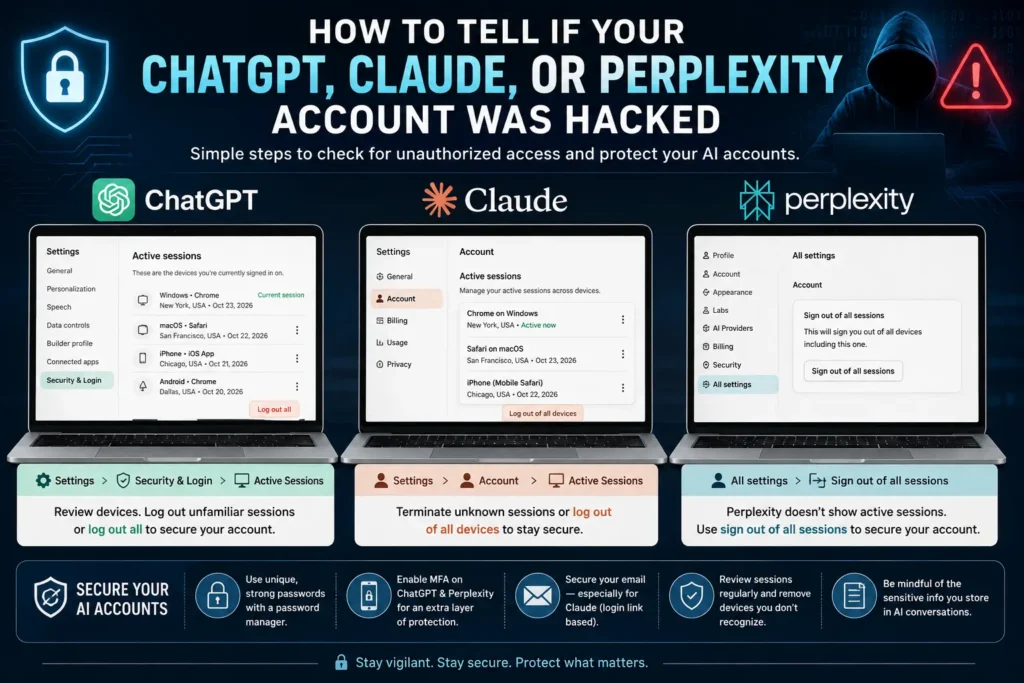
AI chatbots have quietly become some of the most personal accounts people own, storing conversation histories, personal documents, work data, and increasingly sensitive information. That makes them just as attractive a target for hackers as your email or banking login, yet most people have never checked whether their AI accounts are secure. Here’s a complete, platform-by-platform guide to checking for unauthorized access on ChatGPT, Claude, and Perplexity.
Start With the Basics: Passwords and Multi-Factor Authentication
Before diving into platform-specific checks, the fundamentals still apply here just as they do everywhere else online: use a unique password stored in a password manager for each service, and enable multi-factor authentication (MFA) wherever it’s offered. MFA means that even if someone steals your password, they can’t log in without a second piece of verification, typically a code sent to your phone or generated by an authenticator app.
It’s worth knowing upfront that these three platforms handle this differently:
- ChatGPT and Perplexity both offer MFA as a security option.
- Claude does not use MFA in the traditional sense. Instead of a password at all, Anthropic’s chatbot sends a login link directly to your email address, meaning your email account’s security effectively becomes your Claude account’s security.
How to Check ChatGPT for Unauthorized Access
To see if someone else has logged into your ChatGPT account:
- Open ChatGPT on your computer’s browser
- Click your username in the bottom-left corner
- Go to “Settings”, then “Security and Login”
- Click “Active Sessions”
This will show you every device currently logged into your account. If you spot a device you don’t recognize, you can log it out individually, or click “Log out all” to end every session at once and force a fresh login everywhere.
If you want to change your password after spotting something suspicious, you’ll need to log out first. From the login screen, click “Log in,” enter your email, click “Forgot password,” then “Continue.” ChatGPT will email you a six-digit code. Enter that code on the login page, click “Continue,” and set a new password.
How to Check Claude for Unauthorized Access
Claude’s process is similar, though the account structure works differently since there’s no password to compromise in the first place:
- Open Claude in your computer’s browser
- Click your username in the bottom-left corner
- Go to “Settings,” then “Account”
- Look for “Active sessions”
If you see a session you don’t recognize, hover over it, click the three vertical dots that appear on the right, and select “Log out” or “Terminate.” You can also click “Log out of all devices” to clear every active session at once.
Since Claude doesn’t use passwords, there’s nothing to reset. To get back in after logging out, you’ll simply request a new login link sent to your email, which means securing your email account is the single most important step for protecting your Claude account.
How to Check Perplexity for Unauthorized Access
Perplexity works a bit differently than the other two platforms, it doesn’t show you a list of active login sessions by device. Instead, if you’re concerned about unauthorized access, your only option is a blanket sign-out:
- Go to Perplexity in your browser
- Click your username in the bottom-left corner
- Select “All settings”
- Click “Sign out of all sessions,” then “Confirm”
To log back in, enter your email address. Perplexity will send you a six-digit code, which you can either enter directly on the site or use the “Sign in” button included in the email to log in with one click.
Why This Matters More Than It Might Seem
AI chatbot accounts increasingly hold a surprising amount of sensitive personal and professional information: draft emails, business strategy documents, medical or legal questions, personal reflections, and long-running project context that users build up over months of conversations. Someone with unauthorized access to that history could potentially extract far more useful information for identity theft, corporate espionage, or targeted scams than they could from a typical social media account.
This risk isn’t hypothetical. AI platforms have increasingly become targets in the broader cybersecurity landscape this year, from account-level breaches to more sophisticated attacks targeting the underlying AI infrastructure itself. As these tools become more deeply woven into daily work and personal life, treating your AI account security with the same seriousness as your banking login isn’t excessive caution, it’s simply catching up to how much these platforms actually know about you.
A Few Extra Precautions Worth Taking
- Review active sessions periodically, not just when something feels wrong. Make it a habit alongside checking your email and social accounts.
- Secure the email account tied to your Claude login specifically, since it functions as your de facto password for that platform.
- Enable MFA on ChatGPT and Perplexity immediately if you haven’t already, since it’s one of the single most effective protections available.
- Be cautious about what sensitive information you store in long-running AI conversation histories, since that data becomes a bigger liability the longer it accumulates.
For more cybersecurity guides and the latest AI platform security news, keep following Tech News Reports for ongoing updates.