

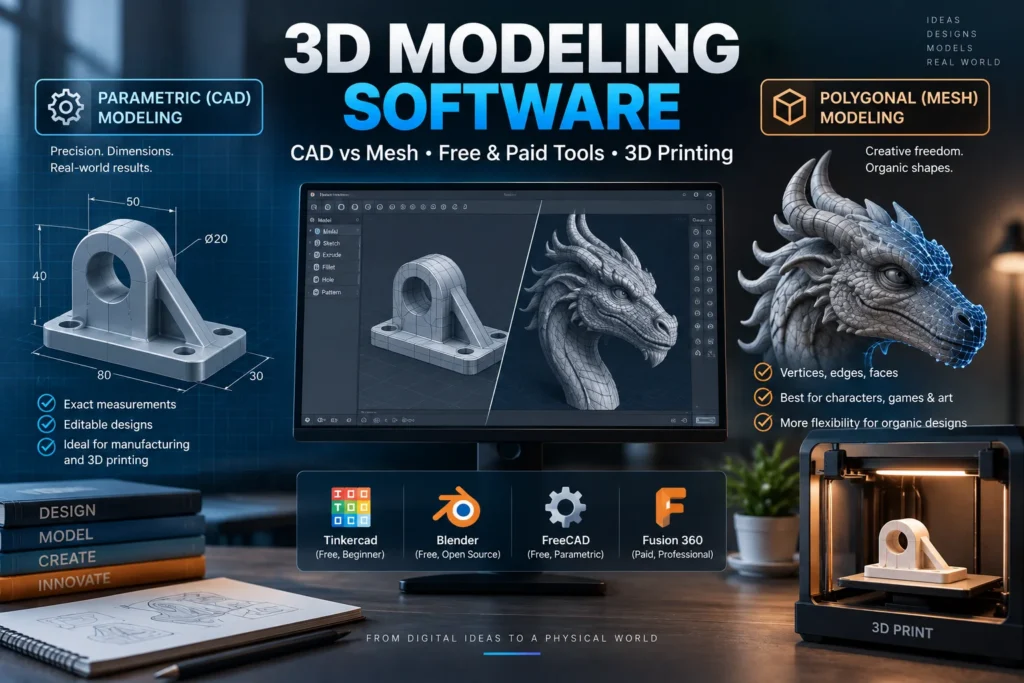
Every 3D-printed bracket, animated film character, video game environment, and architectural walkthrough starts the same way: as a digital model built inside 3D modeling software. What varies enormously is which type of software gets used, since a tool built for precision mechanical parts works completely differently from one built for sculpting an organic character, and picking the wrong one for the job is where most beginners get stuck.
This guide breaks down what 3D modeling software actually does, the core approaches to modeling, how to choose based on what you’re building, and where the category is headed as AI generation tools enter the picture.
What Is 3D Modeling Software?
3D modeling software is a program used to create digital representations of three-dimensional objects, whether that’s a mechanical part destined for manufacturing, a character for a video game, a piece of furniture for an architectural rendering, or a design ready to send to a 3D printer.
The specific approach a piece of software uses to build that geometry matters more than almost any other factor in choosing the right tool, and understanding the two main approaches is the single most useful thing a beginner can learn before picking software.
The Two Core Modeling Approaches
Parametric (CAD) Modeling
Parametric modeling is precision-first. Instead of freely pushing and pulling shapes, you define exact dimensions, constraints, and relationships between features, extrudes, fillets, holes, and the model updates automatically whenever you change a number. This approach is the standard for mechanical and functional parts, since it produces dimensioned geometry that stays editable and predictable. When a part has to be manufactured or fit together with other components, guessing dimensions isn’t an option, which is exactly why parametric CAD dominates product design, mechanical engineering, and architectural modeling. Common examples include Fusion 360, FreeCAD, and AutoCAD.
Polygonal and Mesh Modeling
Mesh modeling works directly with a surface made of vertices, edges, and faces, pushing and pulling geometry freeform rather than through dimensioned constraints. This is the standard approach for video games, film, and general 3D art, since it’s far better suited to organic, irregular shapes like characters, creatures, and natural forms than parametric modeling is. The tradeoff is that mesh models can end up with zero-thickness walls or non-manifold geometry, technical terms for gaps or overlaps in the surface, that need cleanup before the model is usable for something like 3D printing. Blender, Maya, and 3ds Max are the best-known tools in this category.
Why the Distinction Matters for 3D Printing Specifically
For anyone modeling with 3D printing in mind, this distinction isn’t academic, it directly determines how much extra work is needed before a model actually prints. A 3D printer needs a model that’s manifold and watertight, meaning every wall has real thickness and the geometry forms a fully closed shape a slicer can interpret as solid versus empty space.
Parametric/solid modeling tends to produce watertight, printable geometry by default, since dimensioned, constraint-based shapes are inherently closed solids. Mesh modeling can produce genuinely stunning organic shapes, but because it’s built from surfaces rather than solids, it’s more prone to creating unprintable geometry that needs repair before it reaches a slicer. Neither approach is “better” outright, but understanding which one a project needs prevents a lot of frustration for beginners specifically trying to design something for 3D printing.
Free vs. Paid 3D Modeling Software
3D modeling software spans an enormous price range, from genuinely free browser-based tools to professional suites costing thousands of dollars a year, and the free tier has become remarkably capable in recent years.
Free 3D modeling software worth knowing: Tinkercad is a browser-based tool that requires no installation and is widely considered the easiest possible entry point, learnable in an afternoon, making it a popular choice for absolute beginners and classroom settings. Blender is free and open-source, yet capable across modeling, sculpting, texturing, and animation at a level that genuinely competes with paid professional software, which is why it’s frequently cited as the best free 3D modeling software overall. FreeCAD is a free, open-source parametric CAD program that’s become significantly more polished in recent releases, making it a serious free option specifically for functional, dimensioned parts.
Paid 3D modeling software tends to differentiate on collaboration features, cloud-based workflows, industry-specific toolsets, and dedicated customer support. Fusion 360 offers cloud-based parametric modeling well suited to product design teams. AutoCAD remains a standard for precision technical drafting. In film, games, and high-end visual effects, professional suites like Maya, 3ds Max, ZBrush (for high-resolution character sculpting), and Cinema 4D (valued for staying approachable while still reaching professional-grade output) dominate studio pipelines, each typically used for the specific discipline it handles fastest rather than as an all-in-one solution.
Choosing 3D Modeling Software by Use Case
For 3D Printing
Prioritize tools that produce clean, manifold geometry and export cleanly to common print formats like STL and 3MF. Tinkercad is the easiest entry point for simple prints, while Fusion 360 and FreeCAD offer the precise, parametric control needed as projects get more ambitious or functional.
For Product and Mechanical Design
This is CAD territory, full stop. Product and mechanical work depends on parametric controls, exact dimensions, and tolerance handling, often across a collaborating team. Fusion 360 offers an all-in-one cloud platform, FreeCAD provides a free open-source route, and AutoCAD remains the standard for precise technical drafting.
For Architecture and Construction
Architectural and building modeling typically calls for parametric tools that can handle both design geometry and the data-rich requirements of building information modeling (BIM), where a single model needs to track materials, dimensions, and specifications throughout a building’s entire lifecycle. SketchUp is widely used for architectural and interior design work specifically because it balances approachability with the precision needed for construction documentation.
For Beginners
Tinkercad’s browser-based simplicity makes it the most commonly recommended starting point for anyone brand new to 3D modeling, with no software installation and a genuinely gentle learning curve. For beginners who want to grow into more advanced, free, professional-grade software, Blender is the natural next step, since its free price point removes the barrier to experimenting broadly before committing to a specific specialty.
For Film, Games, and Character Art
This is mesh and sculpting territory. ZBrush has become the standard for high-resolution character sculpting, 3ds Max is favored for environments and hard-surface modeling, and Maya remains a common pipeline and animation backbone across studios. Blender, notably, has become a genuinely viable low-risk option for freelancers pursuing studio-level output without a licensing bill.
3D Modeling Software by Platform
Availability varies depending on operating system. Mac users have full access to Blender, Fusion 360, and most major CAD and mesh tools, alongside Apple’s growing ecosystem of creative software. 3D modeling software for iPad has expanded significantly, with simplified, touch-optimized versions of tools like Shapr3D bringing genuine parametric modeling to tablets, useful for on-site design work or quick concept sketching away from a desktop. Online, browser-based 3D modeling software, led by Tinkercad, removes platform considerations entirely, since it runs the same way regardless of operating system.
Why 3D Modeling Software Matters
3D modeling software has become foundational infrastructure across an enormous range of industries: product design and manufacturing, architecture and construction, video game and film production, engineering, and the fast-growing consumer 3D printing space. As 3D printers have become more affordable and widely available, demand for approachable, beginner-friendly modeling tools has grown right alongside professional CAD and mesh software, creating a genuinely wide spectrum of tools serving everyone from hobbyists to studio pipelines.
For businesses evaluating 3D modeling and design tools as part of a broader technology stack, this sits alongside a wider category of specialized creative and engineering software our software industry coverage tracks regularly, and connects closely to the broader CAD landscape covered in our CAD software guide.
3D Modeling and AI: What’s Changing
AI is beginning to reshape 3D modeling in ways that mirror what’s already happened in image and text generation. Emerging AI model generators can now produce rough 3D geometry directly from text descriptions or reference images, and researchers are actively developing benchmarks to evaluate how well AI models handle parametric 3D generation and structural reasoning, the kind of dimensioned, constraint-based thinking that traditional CAD software has always required a human to provide. These tools remain early-stage compared to traditional modeling software, but they represent a genuinely active area of development worth watching for anyone following where the category is headed. For more on how AI is transforming creative and technical software more broadly, see our artificial intelligence coverage.
What Happens Next
A few trends are shaping where 3D modeling software is headed:
- AI-assisted generation moving from novelty to genuine workflow tool. As AI model generators improve at producing clean, manifold geometry rather than rough approximations, expect them to increasingly complement, rather than replace, traditional modeling workflows.
- Continued growth of browser-based and tablet modeling. Tools like Tinkercad and touch-optimized parametric apps are lowering the barrier to entry further, particularly for education and quick prototyping.
- Free, open-source tools closing the gap with paid software. Blender’s continued rise as a professional-grade free alternative, alongside FreeCAD’s maturing parametric capabilities, suggests the line between free and paid 3D modeling software will keep blurring.
- Deeper integration between modeling and 3D printing workflows. As consumer 3D printing continues to grow, expect modeling software to keep tightening its focus on producing genuinely print-ready output by default, rather than requiring separate cleanup steps.
Conclusion
3D modeling software splits fundamentally into two approaches, parametric CAD for precise, dimensioned parts and mesh modeling for organic, freeform shapes, and choosing correctly between them is the single biggest factor in whether a beginner’s first project goes smoothly. Whether the right choice is a free browser tool like Tinkercad, an open-source powerhouse like Blender, or professional CAD software like Fusion 360 depends entirely on what’s being built: a functional 3D-printed part, an architectural model, a game character, or a mechanical assembly. As AI-assisted generation continues to mature, the fundamentals of matching the right modeling paradigm to the right project are likely to remain just as important as they are today.
For continuing coverage of 3D modeling software, CAD tools, and the technology shaping digital design, visit Tech News Reports.